
Zalo OA chatbot: setup, cost and scripts for shops
What a Zalo OA chatbot is, when a shop should use one, five message scripts, what the cost covers and a six-step pilot in two weeks for small retailers.

Picture a customer who messages your Zalo Official Account (OA) at 21:00. They want a price, an update on yesterday's order and to know whether a size can be exchanged. You closed hours ago. Should the bot answer now, ask a follow-up, or hand off to your team tomorrow morning?
This guide covers what a Zalo OA chatbot is, when to use one, what it costs, five scripts you can copy and a two-week pilot.
What a Zalo OA chatbot is
A Zalo Official Account is a business account on Zalo. Customers message the OA, and your team replies from the Zalo app or the OA admin page. A Zalo OA chatbot sits between the two. When a message arrives, the bot reads it, then decides whether to answer, ask a clarifying question, or pass the conversation to a person.
The bot connects to the OA through Zalo's API or a third-party platform. You do not need to write code, but someone on your side must understand your data and own the wording.
A website chatbot usually meets a visitor who is reading and searching. A Zalo chatbot meets a customer who types in short bursts, often without context and at any hour. That difference shapes the design: the bot has to ask before it answers, and it has to know when to stop.
When to use one, and when not yet
Three checks decide it. Start only when all three are true.
- The same questions repeat. "Do you have size M?", "When will it ship?" and "Where is the shop?" arrive every day. The bot has real work to do.
- Your data is ready. Prices, the return policy and delivery times are written down, and someone keeps them current. A bot is only as good as its sources.
- A person receives handoffs. Someone reads transferred conversations during working hours and replies within the time you promised.
Wait if any of these is true:
- You cannot yet name your five most common questions. Read the last hundred messages first.
- Prices or stock change through the day, and nobody updates the sheet the bot reads.
- Nobody reads handoff messages. A silent bot is worse than no bot.
- Most customers need deep advice, such as bespoke design. The bot should be a front door, not the answer.
Figure 1 shows three levels, each with a condition for stopping there. Most shops should stay at the first for several weeks. If the third is unclear, read the RAG guide first.
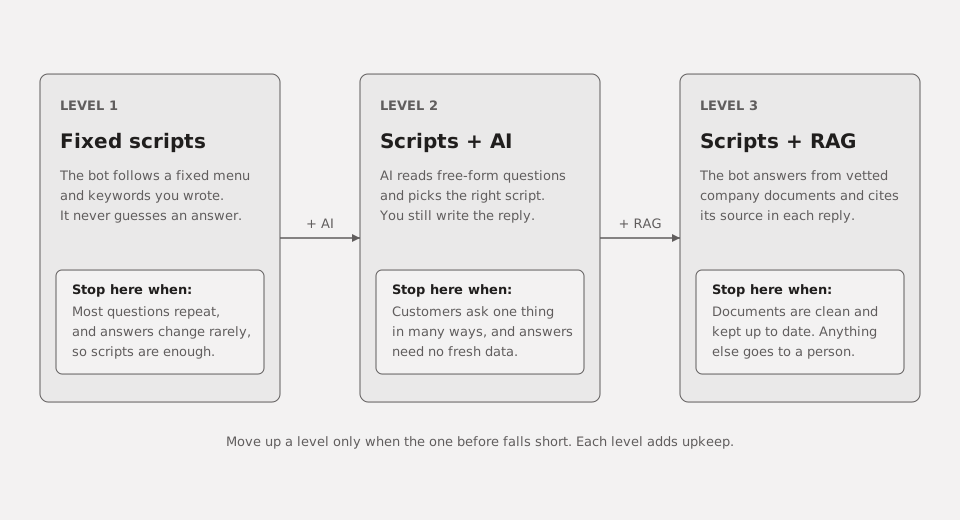
Figure 1. Three levels, from fixed scripts to scripts with RAG. Each level lists the condition for stopping there.
How a message flows
Every message passes four steps: the OA receives it, the bot reads intent, checks the price list, FAQ and order status, then picks one of three paths below.
The bot makes three decisions:
- Answer now when the intent is clear and the data exists, such as opening hours or a published delivery policy.
- Ask a clarifying question when details are missing, such as "Is it in stock?" with no product or size named.
- Hand off to a person for complaints, refund requests or anything out of scope. The bot passes along the question and the reason, so the agent does not start from zero.
The rule is simple. If the bot is unsure, it asks or hands off. It never guesses.
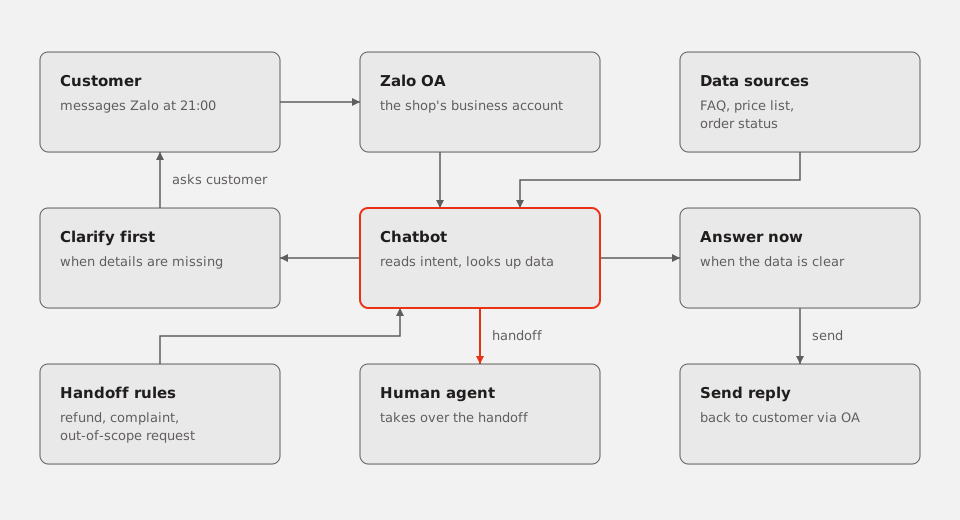
Figure 2. A customer messages the OA. The chatbot reads intent and checks data, then answers, asks or hands off.
Five message scripts
These scripts are short enough to copy. Replace the bracketed parts with your own details.
| Situation | Bot reply | Handoff when |
|---|---|---|
| Greeting, after hours | "Thanks for messaging us. We reply during [hours]. What do you need?" | The customer says it is urgent, or the message arrives [number] hours after closing |
| Price | "[Product] is [price from the list]. Would you like to see other models?" | The price is missing from the data, or the customer asks for wholesale rates |
| Order status | "Please send your order code and we will check it now." | The code matches no order, or the order is older than [number] days |
| Warranty or returns | "We accept returns within [days] if the tag is intact. Please send a photo of the item." | The photo shows damage, or the customer asks for a refund |
| Out of scope | "That needs a team member to answer accurately. We are passing your message on now." | The bot cannot find the answer in approved documents |
If a script gives a wrong answer, fix the source data first, then the wording.
What the cost covers
The cost falls into three buckets. This guide gives no figures, because every shop's message volume and data differ.
- OA and platform: your Zalo OA account, any fees from the third-party platform you choose, and extra features you switch on.
- Integration and build: connecting your data, writing conversation flows, setting up handoffs and testing.
- Content and operations: writing and updating scripts, cleaning data, reading conversation logs, and a person who takes handoffs every day.
The third bucket is easy to overlook, yet it decides whether the bot is still accurate months later. When you request a quote, include your common questions, data sources and channels.
Six steps for a two-week pilot
Setup follows six steps. Each one ends with a result you can check before you move on.
- Register and verify the OA. Zalo has its own rules for OAs and messages; check the Zalo OA admin page before you commit. Record who owns the account and who administers it.
- Choose a platform. Compare a third-party platform with building directly on Zalo's API. Check Vietnamese support, handoff, conversation logs and data export.
- Connect your data. Put the FAQ, price list and order status into one source. Record an update date for each item.
- Write the scripts. Start with the five scripts above. You can use the free AI tools guide to draft wording, but a person on your team approves every line.
- Test 20 real questions. Take 20 real messages from last week, run them through the bot, and grade each reply: correct, asked at the right moment, or handed to the right person.
- Measure and fix. Each week, check the handoff rate, the questions the bot could not answer and how long customers wait. Fix the weakest script first, then rerun the 20 questions.
By the end of week two, you will know whether the bot is worth keeping and how far to extend it.
Five common mistakes
- Rambling answers. A long paragraph for a simple question makes customers send another message. Keep replies to three points.
- No route to a person. The customer gets stuck in a loop of clarifying questions. Every script needs a clear handoff condition and a line saying a person will reply.
- Broadcast spam. Bursts of promotional messages annoy customers and get reported. Zalo has its own rules for OAs and messages; check the admin page before you commit.
- Stale prices. The bot quotes last month's list. Put an update date on every item, and have the bot hand off when data is past its date.
- No logs. Nobody knows what customers asked or how the bot replied. Store each question, reply and handoff reason, and read a sample every week.
Conclusion
A Zalo OA chatbot will not replace your team. It answers what is already clear and passes the rest to people. If your documents are clean, read about a chatbot that answers from documents. For a concrete plan, our AI/Data team can help.
Frequently asked questions
Do I need a verified OA?
Zalo has its own rules for OAs and messages. Check the Zalo OA admin page before you commit.
Does the bot answer after hours?
Yes, for questions that already have a script. Handoff only helps when someone is on shift, so state in your greeting when a person will reply.
Does a chatbot replace staff?
No. It removes repeat questions so your team can focus on advice, complaints and complex orders. If nobody takes handoffs, the bot only drives customers away.