
What is RAG? A guide for small business owners to start
What is RAG? A plain-English guide to retrieval-augmented generation for small business owners: how it works, where it breaks, and how to test it today.
Ask a large language model (LLM) how long a shop's return window is and you get a confident answer. The problem: an LLM looks nothing up. It writes from the memory it was trained on, so a policy changed last week still gets the old answer — or invents a plausible rule.
RAG (Retrieval-Augmented Generation) fixes that: the system opens the right document first, puts it into the prompt, then lets the model answer from it.
This guide starts from machine learning basics, walks through RAG step by step, then lists the failures that break RAG in real projects.
If you just need an AI tool that works today, see our free AI tools for small business first.
From machine learning to LLMs: three steps to know
Machine learning lets a computer find patterns in data instead of a human writing every rule. For an LLM it is simple:
- Data. A large pile of text is the raw material; no answers are labelled.
- Training. The model repeats one loop: predict, compare, adjust its parameters, repeat. Hours to weeks of compute.
- Inference. After training the model is "run" to answer new questions — when you type and wait.
The training task is next-token prediction: after "Hanoi is the capital of ..." the likely next token is "Vietnam". Over millions of sentences the model picks up grammar, knowledge and reasoning patterns.
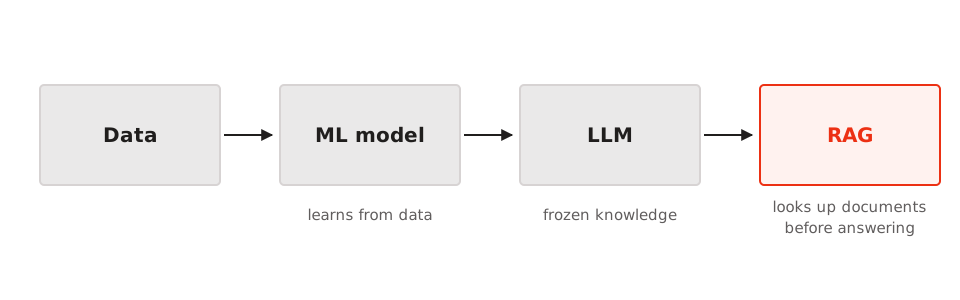
The consequence: knowledge is frozen after training. The model never opens a PDF on your laptop and knows nothing about last week's news. Ask it something it is unsure about and it still answers confidently — the root of hallucination.
What is RAG?
RAG is short for Retrieval-Augmented Generation: you extend a generative model by retrieving relevant information and putting it in the context before generation.
The idea was formalised in Retrieval-Augmented Generation for Knowledge-Intensive NLP Tasks by Lewis et al. in 2020 — the original RAG paper (Lewis et al., 2020). RAG beat fully trained models on knowledge-heavy questions without retraining.
Two halves, two jobs:
- Retrieval: find the passage that answers the question — a search job for an index, not the LLM.
- Generation: write a fluent answer from that passage — the LLM's job.
Two phases:
- Indexing (offline): split documents, turn them into vectors, store them in a vector database. Run whenever the documents change.
- Query (online): on every question, retrieve the closest passages, put them in the prompt, and let the LLM answer. It has to be fast.
How RAG works
Every step, using a shop return policy.
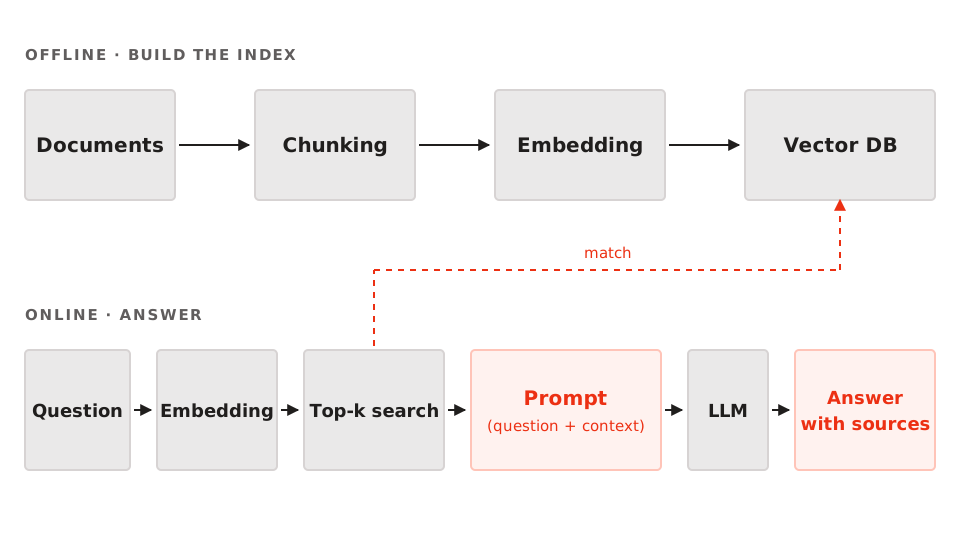
1. Split the documents (chunking)
Long documents do not fit in the model's context window, so you split them into chunks of 300–800 tokens, cutting on sentence boundaries.
2. Turn each chunk into a vector (embedding)
Each chunk becomes a vector — a list of numbers that captures its meaning — so passages that mean the same thing land close together whatever the wording; the Sentence Transformers documentation shows how.
3. Store them in a vector database
The vectors and their text go into a vector database, built to find the nearest vector fast; for a few thousand chunks, approximate cosine search suffices.
4. Find the passages that match the question (top-k)
The question is embedded the same way, and the system takes the top-k closest passages — usually k = 3, 4 or 5 — as context.
5. Build the prompt
The prompt has three parts: instructions, the user's question, and the retrieved passages, plus a rule to cite sources and refuse when the documents lack the answer.
6. Generate the answer with sources
The LLM writes the answer, naming the documents if the prompt asked for citations, so readers can check it and you can spot errors fast.
Pitfalls when you build RAG
- Clean, authoritative data beats a fancier model. RAG is only as good as the documents you feed it; an outdated or contradictory PDF gives a confidently wrong answer.
- Chunk by meaning: 300–800 tokens with 10–15% overlap. Too small loses context, too large adds noise. The overlap carries the last sentence of a chunk into the next.
- Use the same embedding model for indexing and questions. Both vectors must live in the same space. Swapping models without re-indexing is a silent bug: no error, just worse answers.
- Use hybrid search and rerank. Vector search is good at paraphrase, weak at rare keywords. Combine BM25 (keyword scoring) with vector search, then rerank with a cross-encoder. See dense and sparse retrieval for how the two differ in practice.
- Make the prompt demand citations and refuse when data is missing. Answer only from the given context, cite the source, and say so when the documents are not enough.
- Measure with a golden question set. Write 20–50 questions with known answers, then track recall@k (do the k retrieved passages contain the answer), groundedness (does the answer stick to the source) and latency.
- Treat cost, privacy and access control as part of the problem. Filter permissions before a passage enters the prompt: if a user may not read a colleague's salary, the system should not retrieve it. Malicious documents can carry fake instructions (prompt injection).
When you do not need RAG
| Approach | Cost | Data freshness | When to choose it |
|---|---|---|---|
| Paste it into the prompt | Low | Immediate | Few short, changing documents |
| RAG | Medium, index to keep | Minutes to hours | Many documents, sourced answers |
| Fine-tune | High, needs GPUs | Retrain on every change | Changing tone or format; never for new facts |
Choose RAG when the answer must say "according to this document" and be auditable. Never fine-tune to add facts: it is the most expensive way to update.
A one-afternoon RAG checklist
- Collect 20–50 real documents people ask about: FAQ, policies, quotes.
- Try 2–3 chunk sizes (300, 500, 800 tokens) and number the sections.
- Index into a vector store, then test 3–5 real questions.
- Write 10 golden questions with the expected answer, including 2–3 unanswerable ones.
- Measure recall@k and read the 10 answers by hand. Right passage, wrong answer means a prompt problem; wrong passage means a chunking or search bug.
Frequently asked questions
Does RAG remove hallucinations?
No. RAG reduces hallucinations, it does not remove them. If the retrieved passage is wrong, the model can still answer wrongly. Lower the risk with constraints: require citations, allow "the documents do not cover this", check answers stick to sources.
How is RAG different from a Google search?
Google returns pages for you to read. RAG returns a written answer, already summarised, with citations, from documents you control.
Do I need my own vector database?
Not always. For a few thousand chunks an embedded vector search library is enough, and most AI services offer a hosted vector store. Consider a dedicated one when the corpus is large, many people query at once, or latency must be predictable.
Conclusion
RAG is not magic: it is a controlled way to put your documents into an LLM answer — retrieve first, write second. The hard part is the data and the search, so fix those before buying a bigger model. If you would rather start with a working tool today, read the ChatGPT guide for business owners.