
What is an AI agent? A small business owner's guide
What an AI agent is, how it differs from a chatbot and a workflow, four jobs a small business can delegate, and five risks to control before launch today.

Read a few product pages and “AI agent” seems to be attached to everything. The pitch is an assistant that does it all: it reads your inbox, processes orders, reconciles payments, and emails the owner a weekly report without being asked. Much of what carries that label today is really a chatbot with a few extra buttons, or an old automation with a new name.
A real AI agent is narrower, and that is what makes it useful. It has a goal, a set of tools it is allowed to use, and a loop that keeps running until a stop condition is met. Three things decide whether it is safe: how it stops, how much access it has, and whether a person must approve risky steps. This guide covers the definition, the differences, four jobs to try, five risks and a two-week trial.
What is an AI agent?
An AI agent has four parts:
- A goal. A specific result, such as “reply to every quote request before the end of the workday.” Without a clear goal, the agent cannot tell when it is finished.
- Tools and actions. What the agent may touch: read the CRM, create a draft email, open a folder, create a ticket in the accounting software. Each tool is a permission, and each permission should be granted on purpose.
- A loop. The agent plans the next step, takes it, observes the result, then decides whether to continue, stop or try another way.
- A stop and approval rule. When to stop, which actions need a person's approval, and how many steps a single run may take. This is the part most often skipped.
Remove one and you get something else: no tools means it can only write text, no loop means it answers once, and no stop rule means open-ended spending while nobody watches.
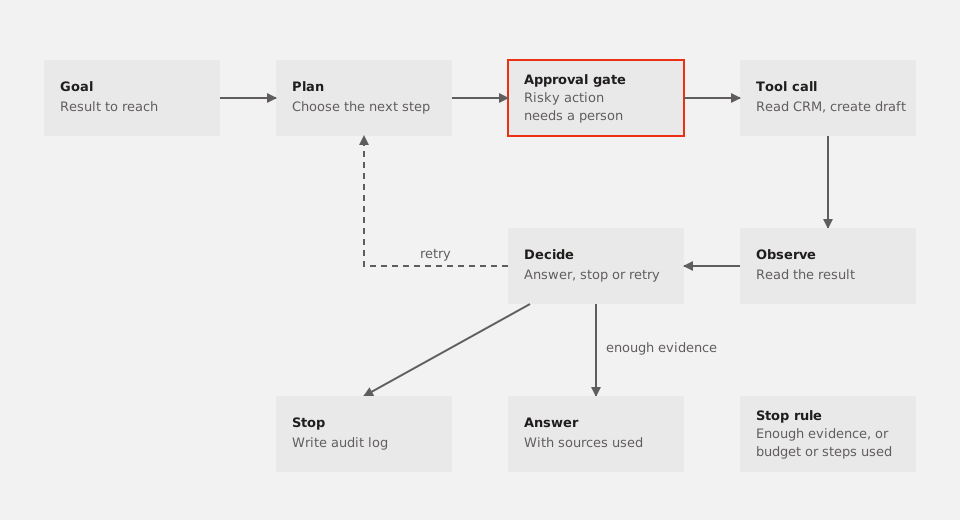
Figure 1. The agent loop. Risky actions always pass through a human approval gate.
The document-reading part of an agent works like RAG: it retrieves the right source first, then answers from that source. If that idea is new to you, read our RAG guide before going further.
Three things people mix up
Chatbots, automated workflows and agents look alike on a screen, but they differ in who decides the next step.
| Type | Input | How it runs | When to use it |
|---|---|---|---|
| Chatbot | A question | Answers in one turn, from loaded documents or general knowledge | Q&A, policy lookup, product help |
| Automated workflow | A fixed event, such as a new order | Runs fixed steps by if-then rules, with no choices of its own | Repeated tasks with clear rules and few exceptions |
| AI agent | A goal, such as “reconcile today's orders” | Plans, calls tools, checks results, then picks the next step | Multi-step tasks with exceptions that need reading and judgment |
A simple way to remember it: a chatbot answers, a workflow follows a script, and an agent chooses its next step within the limits you set. That choice is also where it can go wrong, so if a workflow already does the job, keep it.
Four jobs a small business can hand off
These four jobs suit a first trial: clear inputs, few tools, checkable outputs and easy stop points.
1. Draft replies to quote requests.
- Input: a new email in the quotes inbox.
- Tool: read the inbox, look up the price list and CRM, create a draft.
- Output: a draft reply, labeled “needs pricing” or “needs a person”.
- Stop condition: never sends on its own. Complaints and unusual price requests go straight to the account owner.
2. Reconcile orders.
- Input: the day's orders from the sales platform and the bank statement.
- Tool: read both exports in read-only mode and match them by order code and amount.
- Output: a table of matched orders, amount mismatches, and orders missing paperwork.
- Stop condition: the agent flags and lists, but does not change the books. Mismatches above your threshold go to the accountant.
3. Send payment reminders.
- Input: overdue invoices from the receivables sheet.
- Tool: read the sheet and draft messages from an approved template.
- Output: a queue of reminders, one invoice per message.
- Stop condition: skip paid, disputed or “do not remind” invoices. Nothing goes out until a person approves the queue.
4. Prepare the weekly report.
- Input: sales, ad spend and inventory exports, as spreadsheets.
- Tool: read the sheets you have granted and calculate the metrics you defined in advance.
- Output: a draft report in which every figure names its source column and row.
- Stop condition: the agent stops when the metric list is done. No figure without a source, and no commentary without numbers behind it.
What the four jobs share is this: the agent drafts, reconciles or flags. Sending, paying and changing the books stay with people.
Five risks and how to block them
Because an agent chooses its own next step, an early mistake can carry into later steps. Each risk below needs a concrete control.
| Risk | Control |
|---|---|
| Access is too broad: it can read and write every folder and account | Give each tool the minimum permission, use a separate account for the agent, and block deletion and fund transfers |
| Endless loops and uncontrolled cost | Cap steps and run time per task, set a budget for model calls, and stop when the same action repeats |
| Sensitive data leaves the company | List which data may reach the model, mask ID numbers and salaries, and allow only approved tools |
| Wrong answers that nobody checks | Require a source for every figure, review a sample of outputs, and never send anything to a customer before approval |
| No log, so nobody knows what the agent did | Record every tool call with time, input, output and approver, and keep the records long enough to audit |
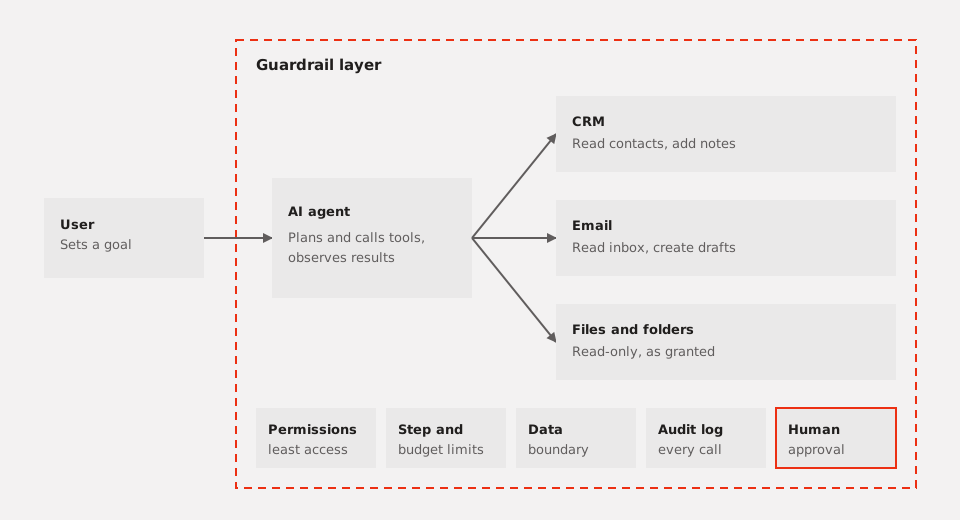
Figure 2. The agent reaches tools only through the guardrail layer. Permissions, step limits, data boundaries, the audit log and approvals are configured outside the model.
A line in the prompt that says “never delete data” is a wish. The real control is an agent account that has no permission to delete anything.
Try it in two weeks
- Pick one job. Choose a repeated task with a clear input and output, such as one of the four above.
- Name one owner. This person reviews the results, decides when the agent may do more, and answers for its mistakes.
- Pick one metric. For example, minutes spent per email, or the share of orders that reconcile on the first pass. One metric avoids arguments about what “good” means.
- Run in shadow mode. The agent works alongside the person but only records its output and sends nothing. Compare the two every day.
- Grant limited autonomy. When results reach the threshold you set, let the agent handle part of the work on its own, while the rest still goes through approval. Widen access one step at a time.
Conclusion
Agents are not the answer to every problem. If the question needs only one answer, a chatbot that answers from documents is enough. If the process is simple and stable, a workflow is cheaper and easier to check. Do not hand work to an agent when nobody owns the results or nobody can see what it did.
If you want an outside team to help choose the first job and set the guardrails, the AI/Data team at Cross Tech Edu can handle the design.
Frequently asked questions
Will an agent replace my staff?
No. An agent drafts, sorts and reminds, but decisions about customers, prices and money stay with people. The realistic goal is less manual typing, not fewer people.
Do I need to code?
It depends on the product. Some let you set the goal, the tools and the stop rules through a settings screen. How far you can go without code varies, and connecting to internal systems or messy data usually needs a technical person. To get a feel for the basics first, look at free AI tools.
What does the cost include?
More than the software or model subscription. The total usually includes time to prepare data, time for a person to review results, time to write and test the stop rules, and time to monitor the agent and fix mistakes. Count all of these when you budget, not just the monthly fee.